Asset pools — the shared library
Pools are named libraries that live outside the brands. You build a pool once ("Valorant backgrounds", "Lo-fi beds", "Gym hashtags") and point any number of brands at it. Three kinds: media (videos and images), audio (music beds) and hashtags (tag sets).
A pool holds explicit files and/or live folders: a folder is re-scanned at every render, so new downloads count automatically — your download folder is the library.
Slots
Eight slots per brand feed the renderer:
| Slot | Feeds |
|---|---|
| Backgrounds | the background behind the main clip |
| CTA | the call-to-action overlay |
| Brainrot | the split-screen filler clip |
| Sounds | the music bed |
| Outro clips | the closing clip — video, or a still held for a set number of seconds |
| Hook assets | the card surface behind a hook line |
| Endcard assets | the card surface behind an endcard line |
| Hashtags | the tag sets the post texts draw from |
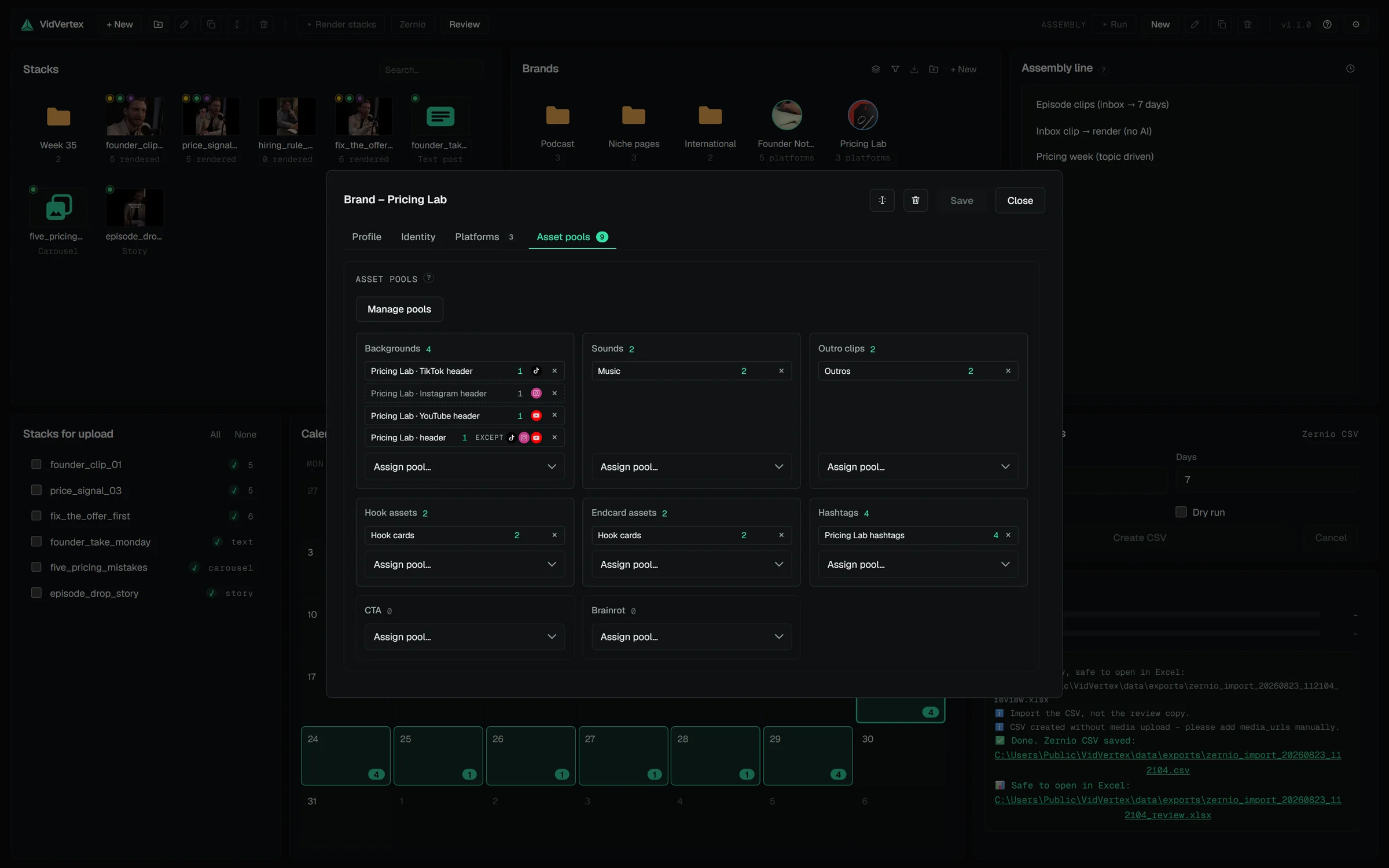
On the Asset pools tab each slot shows chips — one per assigned pool, with the pool's name and its resolved item count. Assign from the dropdown, create a new pool inline with "New pool…", or open the pool manager to work on the library itself.
A slot without a pool is simply skipped. The stack's own file for that widget is used instead — pools are the fallback, never a requirement.
Platform tags
An assignment serves every platform of the brand unless you tag it. Each chip carries a tag button: all platforms, only a set of platforms, or every platform except some. A variant (brand × platform) renders the union of every assignment that serves its platform — so "TikTok gets its own backgrounds, everything else shares the general pool" is two chips: the general pool tagged except TikTok, the TikTok pool tagged only TikTok. A chip whose tag reaches none of the brand's enabled platforms is shown dimmed with a "not active" hint.
Rotation
When a pool resolves to several entries, the renderer cycles through them per variant in a shuffled order — different variants get different backgrounds and sounds automatically, nothing looks cloned.
The pool manager
Manage pools opens the library: a filterable list with a detail pane — rename, duplicate, delete (a delete warns which brands still use the pool and unassigns it), the items with thumbnails, the live folders (native folder picker). The Flow tab draws a slice of the library as a graph — sources → pools → brands → platform icons, hover highlights everything connected — with a scope dropdown (shared pools, unassigned pools, one brand, one brand folder), because the whole library at once is unreadable past a few dozen pools.
The Flow tab answers "which brands does this pool actually feed?" in one glance — pick a scope, hover a pool, and every connected brand and platform lights up.
Filling pools in bulk: the funnel
The asset funnel takes a batch of files (optionally splitting long videos into clips first) and distributes them: shared fills one pool for everyone, exclusive round-robins the files into one pool per brand so channels don't post identical material. The dialog shows the resulting flow before you run it.